

Uncode WordPress Theme Review: Creative Multiuse Theme for $59
The Uncode WordPress theme is a creative multiuse WordPress theme by undsgn, sold on ThemeForest for $59 as a one-time purchase. It holds a 4.89 out of 5 rating from more than 3,500 reviews, has sold 139,058 copies, and was last updated on 8 October 2026 with version 2.12.9. In short: if you want a polished, design-led theme for an agency, portfolio, business or WooCommerce shop — and you are happy to build with WPBakery instead of Elementor — Uncode is one of the strongest $59 themes you can buy today.
This review is based on the live ThemeForest listing, checked on 8 November 2026. I looked at what you actually get for $59, how the builder and demos work, what the licence covers, and where Uncode falls short — so you can decide before you pay. One thing to be clear about from the start: this is a one-time purchase, not a subscription, and it is not a lifetime deal. You pay $59 once for the Regular Licence, you get future updates, and six months of support is included.
Uncode WordPress theme review in short
Uncode is best for designers, agencies, freelancers and small businesses that care about how their site looks. It ships with more than 100 prebuilt demos, an enhanced WPBakery page builder you can use on the front end, a Wireframes library with over 800 section layouts, and deep WooCommerce support. The design quality is the main reason it has kept selling for more than a decade.
It is not the best pick for everyone. The builder is WPBakery, not Elementor or Gutenberg, so pages you build in Uncode are tied to the theme. There is no free version to try, and the Regular Licence covers one website only. But at $59 once, with a 4.89 rating and 139,058 sales behind it, the value is hard to argue with — as long as you know what you are buying.
| Quick facts | Uncode |
|---|---|
| Price (Regular Licence) | $59 one-time |
| Price (Extended Licence) | $2,950 one-time |
| Rating | 4.89 out of 5 |
| Reviews | More than 3,500 |
| Sales | 139,058 |
| Current version | 2.12.9 |
| Last update | 8 October 2026 |
| Author | undsgn (Power Elite author) |
| Support included | 6 months |
| Updates | Future updates included |
You can check the numbers yourself on the official Uncode listing on ThemeForest before you buy, because prices and ratings change over time.
What Is Uncode?
The Uncode WordPress theme is a creative multiuse theme from undsgn, a Power Elite author on Envato Market. It has been one of the best-selling creative themes on ThemeForest for more than a decade, and it is built for almost any kind of website: agency sites, portfolios, business sites, blogs, magazines and online shops.
The theme is clean and modern, with a strong focus on design detail. That shows in the small things: light and dark skins, a careful grid system, ten menu layouts, extensive typography options, and galleries that look like they were designed, not just assembled. It works with WordPress and WooCommerce, it is Gutenberg optimised, and it is certified for WPML, so you can build a multilingual site with it.
The Uncode WordPress theme comes with an enhanced version of WPBakery Page Builder, plus Slider Revolution, LayerSlider and iLightbox bundled in. You do not need to buy those separately. It also includes a Privacy plugin for GDPR, accessibility features that follow WCAG guidance, and a built-in coming soon and maintenance mode, so you can build your site in private before launch.
One honest note: the demo images are not included with your purchase. When you import a demo, the layouts come in with placeholder images, and you add your own photos. That is standard for ThemeForest themes, but it is worth knowing before you expect a one-click copy of a demo.
How Does Uncode Work?
Getting started with the Uncode WordPress theme takes six steps, and most of them are the same as installing any WordPress theme. Here is the simple version.
Step 1: Buy Uncode on ThemeForest
Buy the Regular Licence for $59 from the official Uncode listing on ThemeForest. The price is a one-time payment for the licence, not a subscription, and it includes six months of support from undsgn. After purchase you can download the theme files and your licence details from your ThemeForest account.
Step 2: Install the theme in WordPress
In your WordPress dashboard, go to Appearance, then Themes, then Add New, and upload the Uncode zip file. Activate the theme, then install the bundled plugins it asks for — the page builder, Wireframes and the other tools that come with it. Uncode works with WordPress 6.5 through 7.0, and with WooCommerce 6.x through 10.x.
Step 3: Import a prebuilt demo
Open the demo importer, pick a demo close to the site you want, and import it with one click. The import brings in the pages, layouts and settings. Replace the demo text and images with your own, and you already have a site that looks finished. Keep the demo you like closest, because it saves hours of layout work.
Step 4: Edit pages with the frontend builder
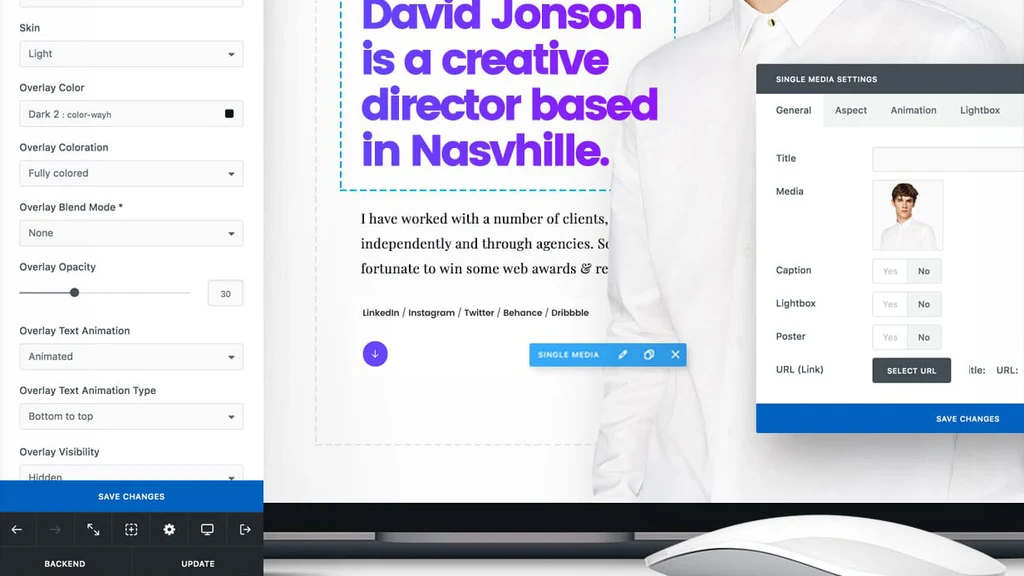
Open any page and edit it on the front end. You see the page exactly as visitors will see it, and you drag elements into place — text, images, headings, buttons, galleries and posts. You can also use the backend editor if you prefer a more structured view. Either way, you do not need to write code for a normal site.
Step 5: Set up your shop, blog or contact pages
If you sell online, install WooCommerce and let Uncode style the shop, product, cart and checkout pages. For a blog or portfolio, use the Posts module to build your archive and single post layouts. Add your contact form, your menu and your footer with the Content Block system, which lets you reuse a header, footer or section on many pages at once.
Step 6: Launch and keep it updated
When the site looks right, point your domain at it and launch. Keep the Uncode WordPress theme and WordPress updated from your dashboard, because updates bring fixes and new features — the current version is 2.12.9, released on 8 October 2026. Check the Uncode change log if you want to see what each update changed.
Key Features of Uncode
The Uncode WordPress theme packs in a lot, so here are the six features that matter most in daily use. Each one is something you will actually use, not a bullet point you forget after buying.
1. More than 100 prebuilt demos
The Uncode WordPress theme ships with a library of more than 100 customisable demos, covering classic business sites, creative agency sites, portfolios, blogs and shops. There are demos for agencies, photographers, restaurants, hotels, lawyers, fitness studios, SaaS products, magazines and more, so most buyers can start from something close to what they need instead of a blank page.
Demo imports are the fastest route to a finished-looking site, but do not leave demo text and images in place. Swap in your own content early, or the site will look like every other site that imported the same demo.

2. Frontend page builder powered by WPBakery
The Uncode WordPress theme is packed with an enhanced version of WPBakery Page Builder. The frontend editor lets you edit your pages on the front of your website, so you see the real result as you work. Rows, columns, headings, text, images, buttons, galleries and posts are all built in, and every module is developed by the Uncode team, which keeps the design consistent.
The builder takes a little time to learn if you have never used WPBakery, but after an hour or two it feels natural. The trade-off is real, though: pages built with this builder are tied to Uncode, so switching themes later means rebuilding pages. That is the main lock-in to accept before you buy.
3. WooCommerce ready, with a product builder
If you sell products, the Uncode WordPress theme works with WooCommerce and styles the shop, product, cart and checkout pages to match your site. It goes further than most themes: the WooCommerce Product Builder lets you design single product layouts with the page builder, and there are custom cart, checkout, my account, login and empty cart pages, plus Ajax filters, variation swatches, a quick view, a side cart and wishlist support.
Uncode does not add its own shop system on top of WooCommerce; it styles and extends the one WordPress already has. That keeps things simple, and it means your orders, payments and shipping still work the way WooCommerce handles them.

4. Adaptive images and 100% responsive design
The Uncode WordPress theme is a responsive theme, so a site built with it adapts to phones, tablets and laptops automatically. Its Dynamic Srcset system creates responsive cropped images and serves only the version each screen needs, which helps pages load faster on mobile without you resizing images by hand.
Responsive design is not optional any more — most visitors will meet your site on a phone first. Uncode also has responsive visibility options, so you can hide or show a section on mobile if it only works on a large screen. Pair the theme with compressed images and a caching plugin, and test the result with a speed tool before you launch.

5. Content Blocks for headers, footers and reusable sections
The Content Block is an Uncode feature you will not find in the same form in other themes. It lets you build a header, a footer or any section once, then reuse it across your site. Change the block in one place and every page using it updates too.
That sounds small, but it saves a lot of repetitive work on a real site. Build your footer once, build a call-to-action section once, and reuse them everywhere instead of copying the same layout page by page.
6. Wireframes: more than 800 section layouts
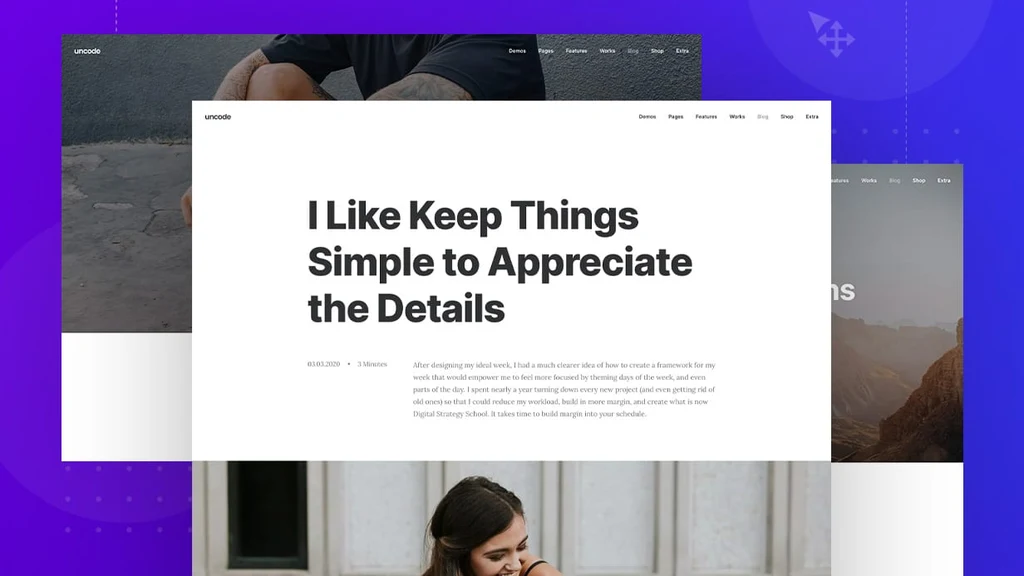
Wireframes is a free plugin bundled with Uncode. It lets you import more than 800 carefully designed section templates — hero sections, pricing tables, testimonials, team sections, galleries and more — and combine them into a page. It is a good middle ground between importing a whole demo and building every section from scratch.
If you like a demo but not its hero section, for example, you can swap that one section for a Wireframe instead of rebuilding the page. For agencies building many client sites, this library alone is worth a lot of the $59.

Also included: a header builder with ten menu layouts, an advanced grid system, Slider Revolution and LayerSlider, WPML certification for multilingual sites, WCAG accessibility features, a GDPR Privacy plugin, shape dividers, animated headings, slides scroll for one-page sites, and light and dark skins. It is a long list, but the six features above are the ones that shape how the theme feels day to day.
Uncode Pricing and Licence
The Uncode WordPress theme is sold on ThemeForest with two licences. The Regular Licence costs $59 and covers use by you or one client in a single end product where end users are not charged for it — in plain words, one website. The Extended Licence costs $2,950 and covers a single end product where end users can be charged, for example a site you sell access to.
| Licence | Price | Use | Support |
|---|---|---|---|
| Regular Licence | $59 | Single end product, end users not charged | 6 months included |
| Extended Licence | $2,950 | Single end product, end users can be charged | 6 months included |
Both licences include future updates and six months of support, and support can be extended to 12 months for an extra fee at checkout. The price is in US dollars and excludes tax and handling fees, so the final total at checkout can be a little higher than $59 depending on where you live. There is no monthly or yearly fee for the theme itself — you pay once, and the theme keeps working. That is a one-time purchase, not a subscription, and it is not a lifetime deal: support is time-limited, and you buy one licence per site.
Is Uncode Worth It?
At $59 for a one-time purchase, the Uncode WordPress theme is good value if you will use it for a real business, portfolio or shop site and you care about design. You get more than 100 demos, more than 800 Wireframe sections, a frontend builder, bundled sliders worth more than the theme on their own, and WooCommerce tools that many themes charge extra for. With 139,058 sales and a 4.89 rating, it is also one of the most proven creative themes on ThemeForest, and it is still being updated — version 2.12.9 came out on 8 October 2026.
It is less good value if you only need a simple blog, or if you already build everything in Elementor and do not want to learn WPBakery. In that case you would pay for a builder you do not want, and the theme would slow you down instead of helping. For everyone else who wants a design-led site without hiring a developer, $59 once is a fair price for what is here.
Pros and Cons
Pros
- One-time $59 Regular Licence — no subscription.
- More than 100 demos and more than 800 Wireframe sections to start from.
- Frontend builder included, with Slider Revolution and LayerSlider bundled in.
- Strong WooCommerce support, including a product builder, Ajax filters and a side cart.
- 139,058 sales and a 4.89 out of 5 rating — proven and maintained for more than a decade.
- Content Blocks, header builder and ten menu layouts for flexible design.
- WPML certified, WCAG accessibility features and a GDPR Privacy plugin included.
Cons
- Regular Licence covers a single end product — one licence per site.
- Support is included for six months only.
- No free version to try before buying.
- Built around WPBakery, not Elementor — switching themes later means rebuilding pages.
- Demo images are not included, so imported demos use placeholder images.
- So many options can feel overwhelming for a first-time user.
Who Should Buy Uncode?
The Uncode WordPress theme suits designers, agencies and freelancers who build sites for clients and want them to look expensive without starting from scratch. It also suits small business owners, photographers, studios and shop owners who want one flexible theme for a portfolio, business site or store, and who are happy to learn a builder for an hour before they start.
It is a weaker fit if you want a simple blog theme, if you are already committed to Elementor, or if you need a theme for many sites on one licence — the Regular Licence is one site only, so agencies need one licence per client site. If you are still comparing, our Avada WordPress Theme Review and our Bridge WordPress Theme Review cover two other long-running multipurpose themes, and they are worth a read before you decide.
Uncode vs Avada vs Enfold vs Bridge
Avada is the closest comparison in size: another long-running multipurpose theme with its own builder and a huge demo set, at $69. Enfold is the budget pick at $59, with the Avia Layout Builder, a 4.79 rating and 272,685 sales. Bridge is the demo-heavy option at $69, with more than 630 demos, Elementor and WPBakery support, a 4.74 rating from 6,952 reviews and 224,659 sales. Uncode sits between them: the same $59 as Enfold, but with a stronger design focus and the Wireframes library.
| Theme | One-time price | Builder | Best for |
|---|---|---|---|
| Uncode | $59 | WPBakery (enhanced) | Creative, portfolio and shop sites |
| Avada | $69 | Fusion Builder | Large sites that want the most popular theme on ThemeForest |
| Enfold | $59 | Avia Layout Builder | Business, portfolio and shop sites on a budget |
| Bridge | $69 | Elementor and WPBakery | Sites that want the biggest demo library |
Read our Enfold WordPress Theme Review for the full comparison with Enfold, and choose by which builder and demo set feels closer to the site you want. If design quality and ready-made sections matter most, Uncode wins this group. If you want Elementor, Bridge is the better fit. If you want the single most popular theme, that is Avada.
Frequently Asked Questions
Is Uncode a lifetime deal?
No. The Uncode WordPress theme is a ThemeForest one-time purchase: the $59 Regular Licence is a single payment for one website, with future updates and six months of support included. It is not a subscription, and it is not a lifetime deal.
How much does Uncode cost?
The Uncode WordPress theme costs $59 for the Regular Licence, which covers one website. The Extended Licence costs $2,950. Both prices are one-time payments in US dollars, excluding tax and handling fees, and both include future updates and six months of support.
Can I use Uncode on more than one website?
No — the Regular Licence covers a single end product, so you need one licence per website. If you run several client sites, you need a separate $59 licence for each one.
Does Uncode work with WooCommerce?
Yes. Uncode styles WooCommerce shop, product, cart and checkout pages, and it adds a product builder, Ajax filters, variation swatches, a quick view, a side cart and wishlist support. It works with WooCommerce 6.x through 10.x.
Is Uncode good for beginners?
Yes — the Uncode WordPress theme is good for beginners who are willing to spend an hour learning the builder. Import a demo, edit its pages on the front end, and replace the content with your own. The number of theme options can feel like a lot at first, so start with a demo and change one thing at a time.
What version is Uncode now?
The current version is 2.12.9, last updated on 8 October 2026. That date comes from the live ThemeForest listing and the Uncode change log, checked on 8 November 2026.
Does Uncode include Slider Revolution?
Yes. Slider Revolution and LayerSlider are both bundled with Uncode, along with iLightbox. You do not need to buy them separately, and you can use them to build sliders and animated headers.
Are demo images included with Uncode?
No. Demo images are not included with your purchase. When you import demo content, the layouts come in with placeholder images, and you add your own photos.
Does Uncode work with Elementor?
The Uncode WordPress theme is built around its enhanced WPBakery page builder, not Elementor. If Elementor is essential to your workflow, Bridge is a better fit, because it supports Elementor and WPBakery. Uncode does work with Gutenberg, and it is Gutenberg optimised.
How long is support included with Uncode?
Six months of support from undsgn is included with both licences. You can extend support to 12 months for an extra fee at checkout, and the theme includes online documentation and a support forum for help beyond that.
Final Verdict
In this Uncode WordPress theme review, the picture is clear: $59 once buys a polished, well-supported creative theme with more than 100 demos, more than 800 Wireframe sections, a frontend builder, bundled sliders and serious WooCommerce tools. The 4.89 rating from more than 3,500 reviews and 139,058 sales are not an accident — this theme has earned its place over more than a decade, and version 2.12.9 shows it is still being updated.
Buy Uncode if you want a design-led site and you are comfortable building with WPBakery. Skip it if you need Elementor, or if you want one licence for many sites. For most creative, agency, portfolio and shop sites, it is an easy yes at $59.
Affiliate Disclosure
Affiliate Disclosure: Some links in this review may earn us a commission at no extra cost to you if you make a purchase. This does not affect our review, which is based on the live ThemeForest listing. This review links directly to the official Uncode listing on ThemeForest.