MagicCanvas Lifetime Deal Review: AI Images, Videos, and Audio for $59
Short answer: Yes — if you regularly make images, videos, or audio for content, ads, or social media, the MagicCanvas lifetime deal on AppSumo is worth a serious look. For a one-time payment starting at $59, you get lifetime access to an all-in-one AI studio that pulls together leading video and image models such as Google Veo, Seedance, Wan, Qwen, GPT, and Nano Banana, instead of paying a separate monthly subscription for each one. That said, this is a new, early-stage launch, so check the live deal page before you buy, and use AppSumo’s 60-day refund window to test it on your own projects.
In this review, I break down what MagicCanvas actually does, how it works, what each pricing tier includes, where it shines, and where it still feels young — so you can decide whether the $59 starting tier is enough, or whether a higher tier makes more sense for your workload.
What Is MagicCanvas?
MagicCanvas is an all-in-one AI creative studio. Its AppSumo headline says it plainly: generate AI images, videos, and audio. Rather than opening one tool for a thumbnail, another for a short video, and a third for voice or music, you describe what you want in one place and MagicCanvas routes that request to the AI models it supports.
AppSumo lists MagicCanvas as an alternative to Higgsfield, Kapwing, and Freepik, and positions it as doing the same kind of job for a one-time price from $59 instead of a subscription. It was also chosen as an AppSumo Launchpad product for its potential and innovation, and it is ranked #1 in Video and #1 in Media & Design on AppSumo at the time of writing. Those rankings can change, so treat them as a snapshot, not a permanent guarantee.
The practical appeal is simple. Creators, marketers, and small teams often pay for several AI subscriptions at once, and many of those subscriptions go unused in quiet months. A lifetime deal changes that math: you pay once, and you keep access under the terms of the deal. The trade-off is that you are buying into a newer product with a smaller review base, which is why the early rating and the refund policy matter so much here.
How It Works
MagicCanvas is built around a simple create-and-manage flow. You do not need to learn a separate interface for every model, because the workspace stays the same while the model behind it changes.
- Start a new chat or project. Open the Create workspace and choose whether you are making a video, an image, or audio.
- Describe what you want. Write a clear prompt, add a reference image if you have one, and pick the model, aspect ratio, length, and quality options shown for that job.
- Generate and review. MagicCanvas creates the result in the workspace, where you can preview it, re-edit it, try again, or delete it.
- Refine with editing tools. Use the built-in options for jobs such as image-to-video, editing a video, extending a video, removing a background, swapping a face, or producing an HD result, depending on the model you selected.
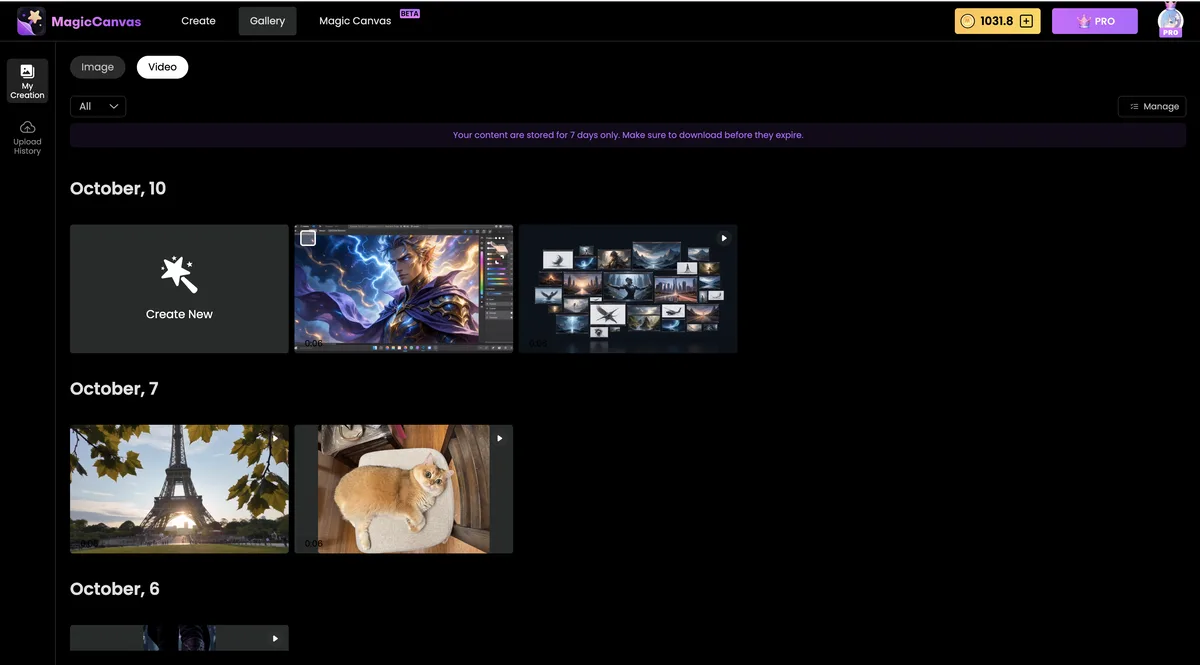
- Manage everything in the Gallery. Finished images and videos are organized by date in the Gallery, so you can find, review, and download your work later.
The Gallery view is especially useful if you create in batches. Instead of hunting through downloads, you can scroll back through dated groups of creations and keep the versions that worked. AppSumo’s screenshots show that content in the Gallery is stored for 7 days only, so download anything you want to keep — do not treat the Gallery as permanent storage.
Key Features
1. One workspace for images, videos, and audio
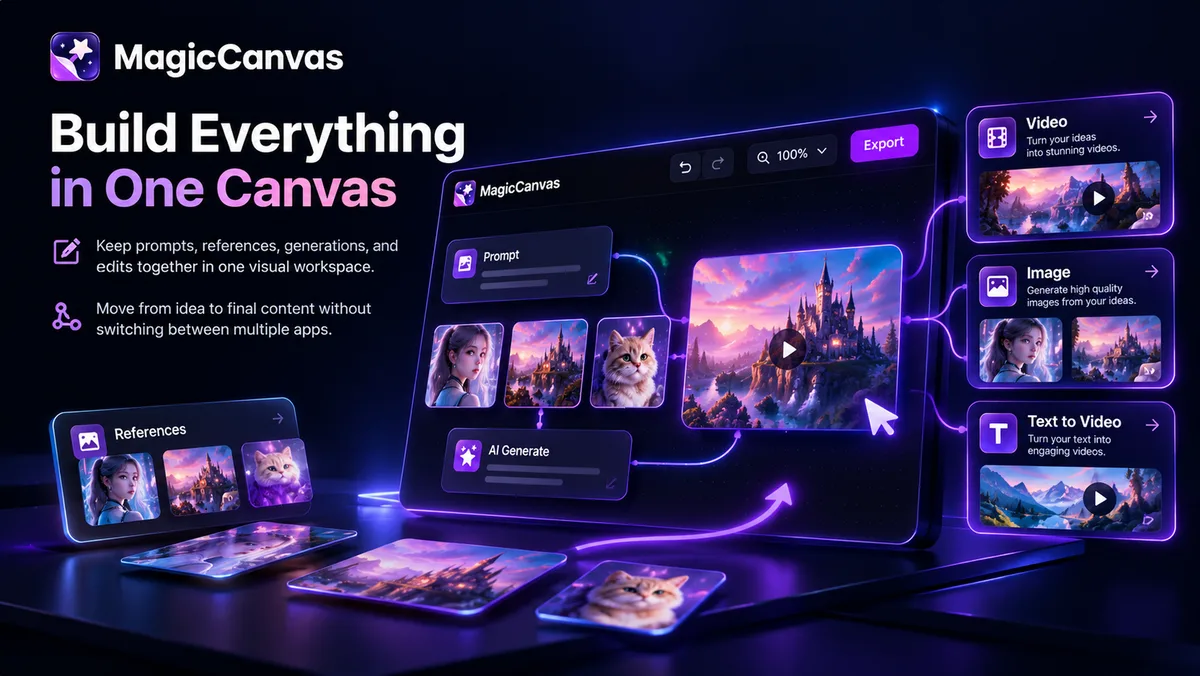
MagicCanvas’s core promise is consolidation. Instead of juggling separate subscriptions for thumbnails, short clips, and audio, you keep one workspace, one credit balance, and one Gallery. For a solo creator, that alone can save both money and the mental overhead of switching tools every day.
2. Access to leading AI models in one place
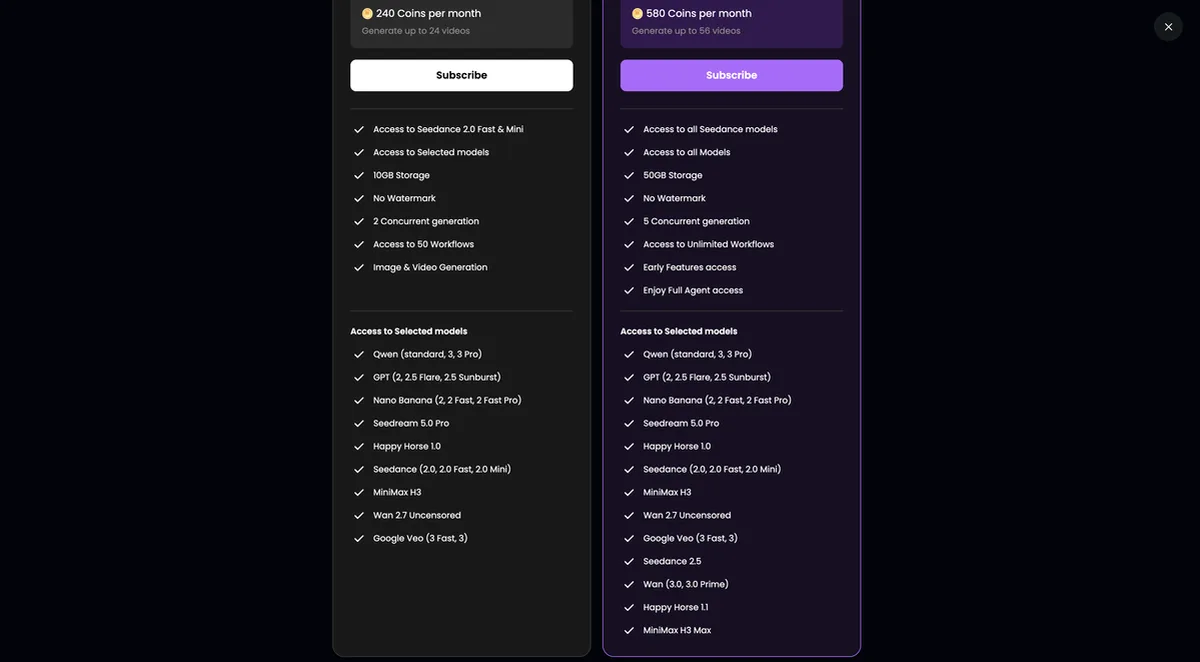
AppSumo highlights Google Veo, Seedance, Wan, Qwen, GPT, Nano Banana, MiniMax, and Happy Horse, among others. The exact model list varies by tier and by what the product supports at the time, so check the live AppSumo feature list before buying if one specific model is your reason for purchasing. The benefit is choice: a realistic video model for one project, a stylized image model for the next, without buying each service separately.
3. Text-to-video and image-to-video creation
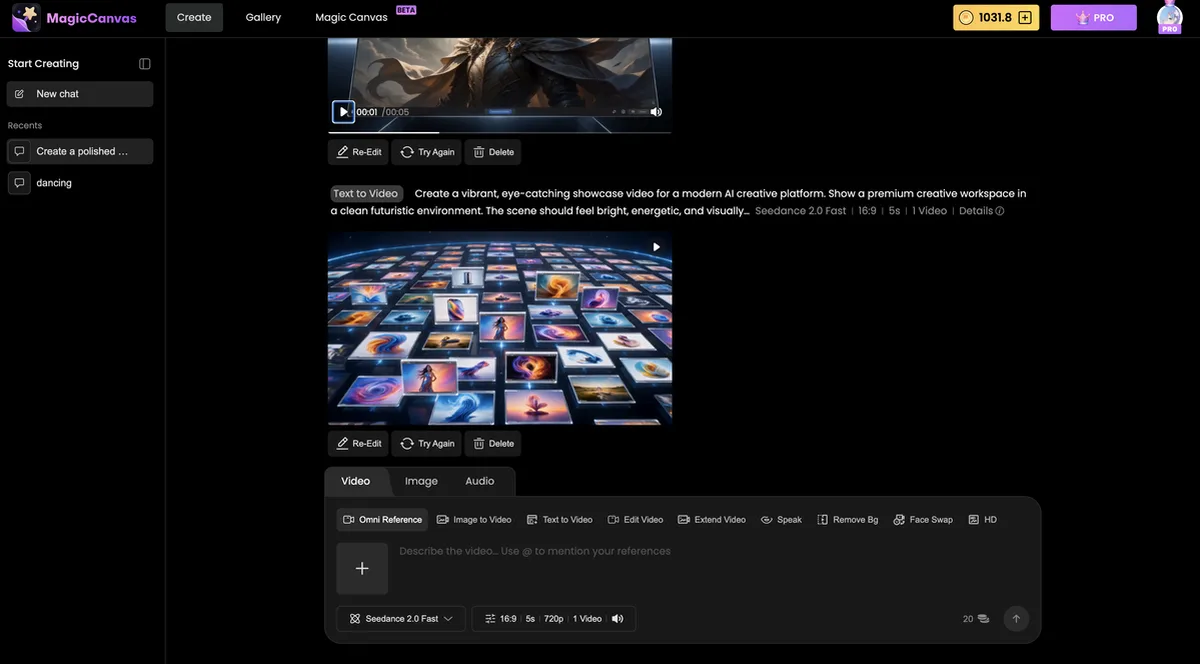
Video is where MagicCanvas tries to stand out. You can start from a written prompt, turn a still image into motion, or build a short showcase clip for a product, course, or social post. AppSumo’s screenshots show a text-to-video workspace with controls for the model, aspect ratio, length, and video settings, plus re-edit and try-again options after a result is produced. That loop — generate, review, refine — is what makes AI video usable in practice, because the first result is rarely the final one.
4. Video editing tools: edit, extend, face swap, and background removal
Beyond simple generation, MagicCanvas lists editing options including editing a video, extending a video, speaking or lip-style tools, removing a background, face swapping, and HD output. These are the features that turn a fun demo into a working tool: you can fix a clip, lengthen it for a platform, or clean up a background without exporting to a separate editor for every small change. Availability still depends on the model and tier you choose, so test the exact edit you need during the refund window.
5. An organized Gallery for your creations
The Gallery groups images and videos by date, with separate views for images and videos. If you produce content in batches — for example, a week’s worth of social posts in one sitting — this makes it much easier to compare versions and pick the best one. Remember the 7-day storage note shown in AppSumo’s Gallery screenshot: download your keepers promptly.
6. Workflows, agents, and a credit-based system
MagicCanvas uses credits, shown in the workspace as a coin balance, and AppSumo’s tier list includes storage, concurrent generation slots, workflows, and agent access that scale with the tier. Higher tiers also add features such as early access to new features and full agent access, according to the AppSumo tier list. The key point for buyers is to match the tier to real usage: a light creator may be fine on Tier 1, while someone generating daily video will burn through credits much faster and should look at Tier 2 or above.
MagicCanvas Pricing: Lifetime Deal Tiers
At the time of writing, on November 4, 2026, MagicCanvas is live on AppSumo with a one-time starting price of $59. AppSumo shows a 60-day refund policy, lifetime access under the deal terms, and the following four tiers. Prices and inclusions can change, so always check the live AppSumo page before buying.
| Tier | One-time price | Credits per month | Storage | Concurrent generation |
|---|---|---|---|---|
| License Tier 1 | $59 | 125 | 10 GB | 1 |
| License Tier 2 | $199 | 440 | 50 GB | 2 |
| License Tier 3 | $399 | 900 | 100 GB | 3 |
| License Tier 4 | $699 | 1,600 | 200 GB | 5 |
All tiers are listed on AppSumo as including lifetime access, and higher tiers add more credits, storage, and concurrent generation, plus expanded model and feature access. AppSumo’s deal terms also note that you must redeem your code within 60 days of purchase, that you can stack up to 4 codes, and that previous AppSumo customers are grandfathered into new feature limits. If you already own an earlier MagicCanvas deal, check the stacking rules on the live page rather than assuming a new purchase is needed.
Is It Worth It? The Starter Tier Value
For most individual creators, Tier 1 at $59 is the sensible starting point — with one important condition: you should test it hard in the first 60 days. At 125 credits per month, 10 GB of storage, and 1 concurrent generation, Tier 1 is best for occasional to regular use, such as a few social videos per week, thumbnails, and short audio or image projects. It is not built for a high-volume agency pumping out dozens of videos a day.
The value case is strongest when you compare it to stacking subscriptions. One AI video subscription, one image subscription, and one audio tool can easily cost more than $59 in a single month. If MagicCanvas covers even two of those jobs well enough for your standard, the lifetime deal pays for itself quickly. If it covers none of them to your quality bar, the 60-day refund window is your safety net — use it, and do not wait until day 59 to try your most demanding project.
One honest caveat: at the time of writing, MagicCanvas has only 10 reviews on AppSumo, with an average rating of 4.70 out of 5 stars. That is a very small sample, and early reviews for a new launch often reflect setup issues, missing features, or expectations that were set too high. It is not a reason to dismiss the product outright, but it is a reason to buy on the strength of your own testing, not on social proof alone.
Pros and Cons
Pros
- One-time price from $59, with no monthly subscription under the deal terms
- Images, videos, and audio in a single workspace, with a shared Gallery
- Access to multiple leading AI models, including Veo, Seedance, Wan, Qwen, GPT, and Nano Banana
- Useful editing tools such as image-to-video, video extension, background removal, and face swap
- 60-day refund window on AppSumo, giving you real time to test it
- Higher tiers scale credits, storage, and concurrent generation for heavier users
Cons
- New launch with only 10 AppSumo reviews and a 4.70-star average at the time of writing
- Credit limits mean heavy daily video generation can get expensive on lower tiers
- Gallery content is shown as stored for only 7 days, so you must download work promptly
- Model availability and features can change, so a specific model should be verified live before buying
- As an early-stage product, some workflows may feel less polished than mature, single-purpose tools
Who Should Buy MagicCanvas?
Content creators and social media managers
If you publish short videos, thumbnails, and promotional images every week, MagicCanvas can replace several small subscriptions with one workspace. Start on Tier 1, test your most common formats, and only upgrade if you regularly hit the credit limit.
Small businesses and marketers
For product demos, ad variations, and landing-page visuals, the combination of image and video generation is genuinely useful. A small team can produce more variations without hiring a designer for every asset, while still using a human designer for hero campaigns where quality matters most.
Agencies and freelancers
Agencies should look at Tier 2 or higher, because concurrent generation and larger credit pools matter when several clients need work at once. Freelancers who serve a few clients can often start lower and stack codes later, subject to AppSumo’s stacking rules.
Course creators and educators
Short explainers, course trailers, and visual examples are a natural fit. The Gallery makes it easy to reuse and adapt assets across lessons, as long as you download final versions for your own library.
Who should wait?
If you need a single, proven model with a long track record, if you generate very high volumes daily, or if you need guaranteed long-term storage inside the tool, wait for more reviews or choose a mature single-purpose tool instead. MagicCanvas is best for buyers who are comfortable testing an early-stage product within the refund window.
MagicCanvas vs Traditional Tools
| Approach | Cost model | Best for | Main drawback |
|---|---|---|---|
| MagicCanvas lifetime deal | One-time, from $59 | All-in-one image, video, and audio creation | New product, credit limits, small review base |
| Separate AI video subscription | Monthly subscription | Deep, specialized video features | Cost adds up, and it does not cover images or audio |
| Separate AI image tool | Monthly subscription | High-quality still images | No video or audio workflow in the same place |
| Traditional video editor | Monthly subscription or one-time license | Precise manual editing | Slower for AI generation, and no built-in AI models |
| Hiring a designer or editor | Per project | Highest quality and brand control | Most expensive and slowest for everyday assets |
The comparison is not about one tool being better in every way. MagicCanvas wins on consolidation and lifetime cost. A specialized tool may still win on depth for a single job. Many buyers will use both: MagicCanvas for everyday volume, and a specialist tool or a human creator for flagship work.
Frequently Asked Questions
1. What is the MagicCanvas lifetime deal price?
At the time of writing, the starting price is $59 one-time for License Tier 1 on AppSumo. Higher tiers cost $199, $399, and $699. Check the live AppSumo page before buying, because prices and availability can change.
2. Is MagicCanvas still live on AppSumo?
Yes, it was live and purchasable on AppSumo on November 4, 2026, when this review was prepared. AppSumo did not show a countdown or days-left figure on the product page at that time, so do not rely on an assumed end date — check the live deal page for current status.
3. What does MagicCanvas do?
It generates AI images, videos, and audio from prompts and references, and includes editing tools such as image-to-video, video extension, background removal, and face swap, depending on the model and tier.
4. Which AI models does MagicCanvas support?
AppSumo highlights Google Veo, Seedance, Wan, Qwen, GPT, Nano Banana, MiniMax, and Happy Horse, among others. The exact list can vary by tier and over time, so verify your must-have model on the live page before buying.
5. How many credits do I get?
Tier 1 includes 125 credits per month, Tier 2 includes 440, Tier 3 includes 900, and Tier 4 includes 1,600, according to AppSumo’s tier list at the time of writing.
6. Is there a refund policy?
Yes, AppSumo lists a 60-day refund policy for this deal. That gives you time to test MagicCanvas on real projects before committing for good.
7. Can I stack codes?
AppSumo’s deal terms say you can stack up to 4 codes, and that codes must be redeemed within 60 days of purchase. Previous AppSumo customers are grandfathered into new feature limits, according to the same terms.
8. Is MagicCanvas good for beginners?
Yes, the prompt-based workspace is beginner-friendly, and the Gallery keeps your work organized. Beginners should still start with simple prompts and test different models, because results vary a lot by model and prompt quality.
9. How long are creations stored in MagicCanvas?
AppSumo’s Gallery screenshot notes that content is stored for 7 days only. Download anything you want to keep, and store final assets in your own library or cloud storage.
10. Is MagicCanvas worth it at $59?
For regular creators who currently pay for more than one AI subscription, $59 is a reasonable test price, especially with the 60-day refund window. For very heavy daily video users, Tier 1 may feel limiting, and a higher tier or a specialized tool may be a better fit.
Final Verdict
MagicCanvas is a promising, early-stage lifetime deal. It does something genuinely useful — bringing image, video, and audio generation, plus a useful set of editing tools, into one workspace — for a one-time price that undercuts stacked monthly subscriptions. The $59 starting tier is a fair entry point for individual creators, provided you test it seriously within the 60-day refund window.
My recommendation: if you make AI visuals or videos regularly, check the live MagicCanvas deal on AppSumo, confirm your must-have model and tier, and try your hardest real project first. If it passes that test, keep it. If it does not, use the refund window and move on — that is exactly what the window is for.
For more deal reviews in the same style, see our NotiQ lifetime deal review, our KWHero lifetime deal review, our NinjaPipe lifetime deal review, and our GetTerms lifetime deal review. If you are still deciding what kind of tool you need, our guide on how to choose SaaS tools for a small business can help you compare options before you buy.
Note: Prices, ratings, tiers, and availability in this review were verified on AppSumo on November 4, 2026. AppSumo deals change, so check the live deal page before buying.